Syncfusion.Blazor.Spinner 31.2.10
Syncfusion® Blazor Spinner Component
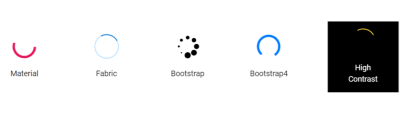
This package contains the Blazor Spinner Component for Blazor application. The Blazor Spinner denotes when long-running tasks are ongoing, tasks for which there is no information about their progress. The component provides circular progress indicators without interaction capabilities.
System Requirements
Getting Started
Help Resources
- Blazor Spinner Component Features Overview
- Blazor Spinner Component Documentation
- Blazor Spinner Component Demos
Support and feedbacks
- For queries, reach our Syncfusion® support team or post the queries through the community forums.
- Request new feature through Syncfusion® feedback portal.
License
This is a commercial product and requires a paid license for possession or use. Syncfusion® licensed software, including this component, is subject to the terms and conditions of Syncfusion® EULA. You can purchase a license here or start a free 30-day trial here.
About Syncfusion®
Founded in 2001 and headquartered in Research Triangle Park, N.C., Syncfusion® has more than 29,000 customers and more than 1 million users, including large financial institutions, Fortune 500 companies, and global IT consultancies.
Today, we provide 1800+ components and frameworks for web (Blazor, ASP.NET Core, ASP.NET MVC, ASP.NET WebForms, JavaScript, Angular, React, Vue, and Flutter), mobile (Xamarin, Flutter, UWP, and JavaScript), and desktop development (WinForms, WPF, WinUI, Flutter and UWP). We provide ready-to-deploy enterprise software for dashboards, reports, data integration, and big data processing. Many customers have saved millions in licensing fees by deploying our software.
sales@syncfusion.com | www.syncfusion.com | Toll Free: 1-888-9 DOTNET
Showing the top 20 packages that depend on Syncfusion.Blazor.Spinner.
| Packages | Downloads |
|---|---|
|
Syncfusion.Blazor.Grid
The Blazor DataGrid component is used to display and manipulate tabular data with configuration options to control the way the data is presented. It can pull data from data sources such as IEnumerable objects, OData web services, or DataManager and binding data fields to columns. It also displays the column header to identify the field with support for grouped records.The most important features available in the datagrid component are paging, sorting, filtering, searching, and grouping.
Key Features
• Data sources: Binds the datagrid component with IEnumerable, DataManager or perform manual data binding.
• Sorting and grouping: Supports n level of sorting and grouping.
• Filtering: Offers filter bar in each column to filter data.
• Paging: Allows easy switching between pages using the pager bar.
• Editing: Provides the options for create, read, update, and delete operations.
• Columns: The column definitions are used as the dataSource schema in the DataGrid. This plays a vital role in rendering column values in the required format.
o Reordering: Allows drag and drop of any column anywhere in the grid’s column header row, thus allowing repositioning of columns.
o Column Chooser: The column chooser provides a list of column names paired with check boxes that allow the visibility to be toggled on the fly.
o Resizing: Resizing allows changing column width on the fly by simply dragging the right corner of the column header.
o Freeze: Columns and rows can be frozen to allow scrolling and comparing cell values.
o Foreign data source: This provides the option to show values from external or lookup data sources in a column based on foreign key/value mapping.
• Selection: Rows or cells can be selected in the datagrid. One or more rows or cells can also be selected by holding Ctrl or Command, or programmatically.
• Aggregation: Provides the option to easily visualized the Aggregates for column values.
• Context menu: The context menu provides a list of actions to be performed in the datagrid. It appears when a cell, header, or the pager is right-clicked.
• Clipboard: Selected rows and cells can be copied from the datagrid
• Export: Provides the options to Export the datagrid data to Excel, PDF, and CSV formats.
• RTL support: Provides right-to-left mode that aligns the datagrid content from right to left.
• Localization: Provides an inherent support to localize the UI.
• Live Updates: Optimized for handling live data updates.
• Master Detail Grid: The detail grid shows the corresponding child information of the selected parent grid record.
Helpful links:
Feature tour: https://www.syncfusion.com/blazor-components/blazor-datagrid?utm_source=nuget&utm_medium=listing
Documentation: https://blazor.syncfusion.com/documentation/datagrid/?utm_source=nuget&utm_medium=listing
Demos: https://blazor.syncfusion.com/demos/datagrid/overview?utm_source=nuget&utm_medium=listing
Support:
Incident: https://www.syncfusion.com/support/directtrac/incidents/newincident/?utm_source=nuget&utm_medium=listing
Forum: https://www.syncfusion.com/forums/blazor-components/?utm_source=nuget&utm_medium=listing
This is a commercial product and requires a paid license for possession or use. Syncfusion’s licensed software, including this component, is subject to the terms and conditions of Syncfusion's EULA (https://www.syncfusion.com/eula/es/). To acquire a license, you can purchase one at https://www.syncfusion.com/sales/products or start a free 30-day trial here (https://www.syncfusion.com/account/manage-trials/start-trials).
© Copyright 2021 Syncfusion, Inc. All Rights Reserved. The Syncfusion Essential Studio license and copyright applies to this distribution.
|
2 |
|
Syncfusion.Blazor.Grid
This package provides the functionality to utilize the features of Syncfusion Blazor DataGrid component and more.
|
2 |
|
Syncfusion.Blazor.Navigations
This package provides the functionality to utilize the features of Syncfusion Blazor Accordion, Context Menu, Menu Bar, Tabs, Toolbar, Tree-view, and Sidebar.
|
1 |
|
Syncfusion.Blazor.Inputs
This package provides the functionality to utilize the features of Syncfusion® Blazor Color Picker, File Upload, MaskedTextBox, NumericTextBox, Slider, TextBox and Rating.
|
1 |
|
Syncfusion.Blazor.Grid
This package provides the functionality to utilize the features of Syncfusion Blazor DataGrid component and more.
|
1 |
|
Syncfusion.Blazor.Grid
This package provides the functionality to utilize the features of Syncfusion® Blazor DataGrid component and more.
|
1 |
|
Syncfusion.Blazor.DropDowns
This package provides the functionality to utilize the features of Syncfusion® Blazor AutoComplete, ComboBox, DropDownList, ListBox, and MultiSelect Dropdown.
|
1 |
|
Syncfusion.Blazor.SplitButtons
This package provides the functionality to utilize the features of Syncfusion® Blazor Button Group, Dropdown Menu, Split Button, and Progress Button.
|
1 |
|
Syncfusion.Blazor.InPlaceEditor
This package provides the functionality to utilize the features of Syncfusion® Blazor InPlaceEditor component and more.
|
1 |
|
Syncfusion.Blazor.Navigations
This package provides the functionality to utilize the features of Syncfusion® Blazor Accordion, Context Menu, Menu Bar, Tabs, Toolbar, Tree-view, and Sidebar.
|
1 |
|
Syncfusion.Blazor.Grid
The Blazor DataGrid component is used to display and manipulate tabular data with configuration options to control the way the data is presented. It can pull data from data sources such as IEnumerable objects, OData web services, or DataManager and binding data fields to columns. It also displays the column header to identify the field with support for grouped records.The most important features available in the datagrid component are paging, sorting, filtering, searching, and grouping.
Key Features
• Data sources: Binds the datagrid component with IEnumerable, DataManager or perform manual data binding.
• Sorting and grouping: Supports n level of sorting and grouping.
• Filtering: Offers filter bar in each column to filter data.
• Paging: Allows easy switching between pages using the pager bar.
• Editing: Provides the options for create, read, update, and delete operations.
• Columns: The column definitions are used as the dataSource schema in the DataGrid. This plays a vital role in rendering column values in the required format.
o Reordering: Allows drag and drop of any column anywhere in the grid’s column header row, thus allowing repositioning of columns.
o Column Chooser: The column chooser provides a list of column names paired with check boxes that allow the visibility to be toggled on the fly.
o Resizing: Resizing allows changing column width on the fly by simply dragging the right corner of the column header.
o Freeze: Columns and rows can be frozen to allow scrolling and comparing cell values.
o Foreign data source: This provides the option to show values from external or lookup data sources in a column based on foreign key/value mapping.
• Selection: Rows or cells can be selected in the datagrid. One or more rows or cells can also be selected by holding Ctrl or Command, or programmatically.
• Aggregation: Provides the option to easily visualized the Aggregates for column values.
• Context menu: The context menu provides a list of actions to be performed in the datagrid. It appears when a cell, header, or the pager is right-clicked.
• Clipboard: Selected rows and cells can be copied from the datagrid
• Export: Provides the options to Export the datagrid data to Excel, PDF, and CSV formats.
• RTL support: Provides right-to-left mode that aligns the datagrid content from right to left.
• Localization: Provides an inherent support to localize the UI.
• Live Updates: Optimized for handling live data updates.
• Master Detail Grid: The detail grid shows the corresponding child information of the selected parent grid record.
Helpful links:
Feature tour: https://www.syncfusion.com/blazor-components/blazor-datagrid?utm_source=nuget&utm_medium=listing
Documentation: https://blazor.syncfusion.com/documentation/datagrid/?utm_source=nuget&utm_medium=listing
Demos: https://blazor.syncfusion.com/demos/datagrid/overview?utm_source=nuget&utm_medium=listing
Support:
Incident: https://www.syncfusion.com/support/directtrac/incidents/newincident/?utm_source=nuget&utm_medium=listing
Forum: https://www.syncfusion.com/forums/blazor-components/?utm_source=nuget&utm_medium=listing
This is a commercial product and requires a paid license for possession or use. Syncfusion’s licensed software, including this component, is subject to the terms and conditions of Syncfusion's EULA (https://www.syncfusion.com/eula/es/). To acquire a license, you can purchase one at https://www.syncfusion.com/sales/products or start a free 30-day trial here (https://www.syncfusion.com/account/manage-trials/start-trials).
© Copyright 2021 Syncfusion, Inc. All Rights Reserved. The Syncfusion Essential Studio license and copyright applies to this distribution.
|
1 |
.NET 8.0
- Syncfusion.Blazor.Core (>= 31.2.10)
.NET 9.0
- Syncfusion.Blazor.Core (>= 31.2.10)
.NET 10.0
- Syncfusion.Blazor.Core (>= 31.2.10)
| Version | Downloads | Last updated |
|---|---|---|
| 31.2.18 | 1 | 12/09/2025 |
| 31.2.16 | 0 | 12/09/2025 |
| 31.2.15 | 0 | 11/25/2025 |
| 31.2.12 | 0 | 11/18/2025 |
| 31.2.10 | 1 | 12/09/2025 |
| 31.2.5 | 0 | 11/03/2025 |
| 31.2.4 | 0 | 12/09/2025 |
| 31.2.3 | 0 | 10/21/2025 |
| 31.2.2 | 0 | 10/15/2025 |
| 31.1.23 | 0 | 10/06/2025 |
| 31.1.22 | 0 | 09/30/2025 |
| 31.1.21 | 0 | 09/22/2025 |
| 31.1.20 | 1 | 12/09/2025 |
| 31.1.19 | 0 | 09/11/2025 |
| 31.1.18 | 0 | 09/10/2025 |
| 31.1.17 | 0 | 09/05/2025 |
| 30.2.7 | 0 | 08/25/2025 |
| 30.2.6 | 0 | 08/18/2025 |
| 30.2.5 | 0 | 08/13/2025 |
| 30.2.4 | 0 | 08/07/2025 |
| 30.1.42 | 0 | 07/28/2025 |
| 30.1.41 | 0 | 07/22/2025 |
| 30.1.40 | 0 | 07/14/2025 |
| 30.1.39 | 0 | 07/08/2025 |
| 30.1.38 | 0 | 07/01/2025 |
| 30.1.37 | 0 | 06/25/2025 |
| 29.2.11 | 0 | 06/16/2025 |
| 29.2.10 | 0 | 06/09/2025 |
| 29.2.9 | 0 | 12/09/2025 |
| 29.2.8 | 0 | 06/03/2025 |
| 29.2.7 | 0 | 05/26/2025 |
| 29.2.5 | 0 | 05/21/2025 |
| 29.2.4 | 1 | 12/09/2025 |
| 29.1.41 | 0 | 05/05/2025 |
| 29.1.40 | 0 | 04/28/2025 |
| 29.1.39 | 0 | 04/21/2025 |
| 29.1.38 | 0 | 04/14/2025 |
| 29.1.37 | 0 | 04/08/2025 |
| 29.1.35 | 0 | 04/01/2025 |
| 29.1.33 | 0 | 03/25/2025 |
| 28.2.12 | 0 | 03/19/2025 |
| 28.2.11 | 0 | 03/10/2025 |
| 28.2.9 | 0 | 03/04/2025 |
| 28.2.7 | 0 | 02/25/2025 |
| 28.2.6 | 0 | 02/17/2025 |
| 28.2.5 | 0 | 02/11/2025 |
| 28.2.4 | 0 | 02/04/2025 |
| 28.2.3 | 0 | 01/29/2025 |
| 28.1.41 | 0 | 01/20/2025 |
| 28.1.39 | 0 | 01/13/2025 |
| 28.1.38 | 0 | 01/07/2025 |
| 28.1.37 | 0 | 12/31/2024 |
| 28.1.36 | 0 | 12/23/2024 |
| 28.1.35 | 0 | 12/18/2024 |
| 28.1.33 | 0 | 12/12/2024 |
| 27.2.5 | 0 | 12/02/2024 |
| 27.2.4 | 1 | 12/09/2025 |
| 27.2.3 | 0 | 11/22/2024 |
| 27.2.2 | 0 | 11/15/2024 |
| 27.1.58 | 0 | 11/04/2024 |
| 27.1.57 | 0 | 10/28/2024 |
| 27.1.56 | 0 | 10/23/2024 |
| 27.1.55 | 0 | 10/21/2024 |
| 27.1.53 | 0 | 10/14/2024 |
| 27.1.52 | 0 | 10/07/2024 |
| 27.1.51 | 0 | 09/30/2024 |
| 27.1.50 | 0 | 09/23/2024 |
| 27.1.48 | 0 | 09/18/2024 |
| 26.2.14 | 0 | 09/09/2024 |
| 26.2.13 | 0 | 09/05/2024 |
| 26.2.12 | 0 | 09/02/2024 |
| 26.2.11 | 1 | 12/09/2025 |
| 26.2.10 | 0 | 08/19/2024 |
| 26.2.9 | 0 | 08/12/2024 |
| 26.2.8 | 0 | 08/05/2024 |
| 26.2.7 | 0 | 07/29/2024 |
| 26.2.5 | 0 | 07/26/2024 |
| 26.2.4 | 0 | 07/24/2024 |
| 26.1.42 | 0 | 07/15/2024 |
| 26.1.41 | 0 | 07/08/2024 |
| 26.1.40 | 0 | 07/01/2024 |
| 26.1.39 | 0 | 06/24/2024 |
| 26.1.38 | 0 | 06/18/2024 |
| 26.1.35 | 0 | 06/11/2024 |
| 25.2.7 | 0 | 06/03/2024 |
| 25.2.6 | 0 | 05/28/2024 |
| 25.2.5 | 0 | 05/21/2024 |
| 25.2.4 | 0 | 05/14/2024 |
| 25.2.3 | 0 | 05/08/2024 |
| 25.1.42 | 0 | 04/29/2024 |
| 25.1.41 | 0 | 04/23/2024 |
| 25.1.40 | 0 | 04/15/2024 |
| 25.1.39 | 0 | 04/08/2024 |
| 25.1.38 | 0 | 04/01/2024 |
| 25.1.37 | 0 | 03/26/2024 |
| 25.1.35 | 0 | 03/15/2024 |
| 24.2.9 | 0 | 03/04/2024 |
| 24.2.8 | 0 | 02/26/2024 |
| 24.2.7 | 0 | 02/19/2024 |
| 24.2.6 | 1 | 12/09/2025 |
| 24.2.5 | 1 | 12/09/2025 |
| 24.2.4 | 0 | 02/05/2024 |
| 24.2.3 | 0 | 01/31/2024 |
| 24.1.47 | 0 | 01/22/2024 |
| 24.1.46 | 0 | 01/16/2024 |
| 24.1.45 | 0 | 01/08/2024 |
| 24.1.44 | 0 | 01/02/2024 |
| 24.1.43 | 0 | 12/27/2023 |
| 24.1.41 | 0 | 12/18/2023 |
| 23.2.7 | 0 | 12/06/2023 |
| 23.2.6 | 0 | 11/28/2023 |
| 23.2.5 | 0 | 11/23/2023 |
| 23.2.4 | 0 | 11/20/2023 |
| 23.1.44 | 0 | 11/06/2023 |
| 23.1.43 | 0 | 10/30/2023 |
| 23.1.42 | 0 | 12/09/2025 |
| 23.1.41 | 0 | 10/16/2023 |
| 23.1.40 | 0 | 10/10/2023 |
| 23.1.39 | 0 | 10/04/2023 |
| 23.1.38 | 0 | 09/26/2023 |
| 23.1.36 | 0 | 09/15/2023 |
| 22.2.12 | 0 | 09/05/2023 |
| 22.2.11 | 0 | 08/28/2023 |
| 22.2.10 | 0 | 08/22/2023 |
| 22.2.9 | 0 | 08/14/2023 |
| 22.2.8 | 0 | 08/07/2023 |
| 22.2.7 | 1 | 12/09/2025 |
| 22.2.5 | 0 | 12/09/2025 |
| 22.1.39 | 0 | 07/18/2023 |
| 22.1.38 | 0 | 07/11/2023 |
| 22.1.37 | 0 | 07/03/2023 |
| 22.1.36 | 0 | 06/28/2023 |
| 22.1.34 | 0 | 06/21/2023 |
| 21.2.10 | 0 | 06/13/2023 |
| 21.2.9 | 0 | 06/06/2023 |
| 21.2.8 | 0 | 05/30/2023 |
| 21.2.6 | 0 | 05/22/2023 |
| 21.2.5 | 0 | 05/15/2023 |
| 21.2.4 | 0 | 05/09/2023 |
| 21.2.3 | 0 | 05/03/2023 |
| 21.1.41 | 0 | 04/19/2023 |
| 21.1.39 | 0 | 04/10/2023 |
| 21.1.38 | 0 | 04/03/2023 |
| 21.1.37 | 0 | 03/29/2023 |
| 21.1.35 | 0 | 03/23/2023 |
| 20.4.0.54 | 0 | 03/13/2023 |
| 20.4.0.53 | 0 | 03/07/2023 |
| 20.4.0.52 | 0 | 02/28/2023 |
| 20.4.0.51 | 0 | 02/21/2023 |
| 20.4.0.50 | 1 | 12/09/2025 |
| 20.4.0.49 | 0 | 02/07/2023 |
| 20.4.0.48 | 0 | 02/01/2023 |
| 20.4.0.44 | 0 | 01/18/2023 |
| 20.4.0.43 | 0 | 01/10/2023 |
| 20.4.0.42 | 0 | 01/04/2023 |
| 20.4.0.41 | 0 | 12/29/2022 |
| 20.4.0.40 | 0 | 12/28/2022 |
| 20.4.0.38 | 0 | 12/21/2022 |
| 20.3.0.61 | 0 | 12/12/2022 |
| 20.3.0.60 | 0 | 12/06/2022 |
| 20.3.0.59 | 0 | 11/29/2022 |
| 20.3.0.58 | 0 | 11/22/2022 |
| 20.3.0.57 | 0 | 11/15/2022 |
| 20.3.0.56 | 0 | 11/08/2022 |
| 20.3.0.52 | 0 | 10/27/2022 |
| 20.3.0.50 | 1 | 12/09/2025 |
| 20.3.0.49 | 0 | 10/11/2022 |
| 20.3.0.48 | 0 | 10/05/2022 |
| 20.3.0.47 | 1 | 12/09/2025 |
| 20.2.0.50 | 0 | 09/20/2022 |
| 20.2.0.49 | 0 | 09/13/2022 |
| 20.2.0.48 | 0 | 09/06/2022 |
| 20.2.0.46 | 0 | 08/30/2022 |
| 20.2.0.45 | 0 | 08/23/2022 |
| 20.2.0.44 | 0 | 08/16/2022 |
| 20.2.0.43 | 0 | 08/08/2022 |
| 20.2.0.40 | 0 | 07/26/2022 |
| 20.2.0.39 | 0 | 07/19/2022 |
| 20.2.0.38 | 0 | 07/12/2022 |
| 20.2.0.36 | 1 | 12/09/2025 |
| 20.1.0.61 | 0 | 06/20/2022 |
| 20.1.0.60 | 0 | 12/09/2025 |
| 20.1.0.59 | 0 | 06/07/2022 |
| 20.1.0.58 | 0 | 05/31/2022 |
| 20.1.0.57 | 0 | 05/24/2022 |
| 20.1.0.56 | 0 | 05/17/2022 |
| 20.1.0.55 | 0 | 05/12/2022 |
| 20.1.0.52 | 0 | 05/03/2022 |
| 20.1.0.51 | 0 | 04/26/2022 |
| 20.1.0.50 | 1 | 12/09/2025 |
| 20.1.0.48 | 0 | 04/12/2022 |
| 20.1.0.47 | 0 | 04/04/2022 |
| 19.4.0.56 | 0 | 03/15/2022 |
| 19.4.0.55 | 0 | 12/09/2025 |
| 19.4.0.54 | 0 | 03/01/2022 |
| 19.4.0.53 | 0 | 02/22/2022 |
| 19.4.0.52 | 0 | 02/15/2022 |
| 19.4.0.50 | 1 | 12/09/2025 |
| 19.4.0.48 | 0 | 01/31/2022 |
| 19.4.0.47 | 0 | 01/25/2022 |
| 19.4.0.43 | 0 | 01/18/2022 |
| 19.4.0.42 | 0 | 01/11/2022 |
| 19.4.0.41 | 0 | 01/04/2022 |
| 19.4.0.40 | 0 | 12/28/2021 |
| 19.4.0.38 | 0 | 12/17/2021 |
| 19.3.0.59 | 0 | 12/14/2021 |
| 19.3.0.57 | 0 | 12/07/2021 |
| 19.3.0.56 | 0 | 11/30/2021 |
| 19.3.0.55 | 0 | 11/23/2021 |
| 19.3.0.54 | 0 | 11/17/2021 |
| 19.3.0.53 | 0 | 11/12/2021 |
| 19.3.0.48 | 0 | 11/02/2021 |
| 19.3.0.47 | 0 | 10/26/2021 |
| 19.3.0.46 | 0 | 10/19/2021 |
| 19.3.0.45 | 0 | 10/12/2021 |
| 19.3.0.44 | 0 | 10/05/2021 |
| 19.3.0.43 | 0 | 09/30/2021 |
| 19.2.0.62 | 0 | 09/13/2021 |
| 19.2.0.60 | 0 | 09/07/2021 |
| 19.2.0.59 | 1 | 12/09/2025 |
| 19.2.0.57 | 0 | 08/24/2021 |
| 19.2.0.56 | 0 | 08/17/2021 |
| 19.2.0.55 | 0 | 08/11/2021 |
| 19.2.0.51 | 0 | 08/02/2021 |
| 19.2.0.49 | 0 | 07/27/2021 |
| 19.2.0.48 | 0 | 07/19/2021 |
| 19.2.0.47 | 0 | 07/13/2021 |
| 19.2.0.46 | 0 | 07/06/2021 |
| 19.2.0.44 | 0 | 06/30/2021 |
| 19.1.0.69 | 0 | 06/14/2021 |
| 19.1.0.67 | 0 | 06/07/2021 |
| 19.1.0.66 | 0 | 05/31/2021 |
| 19.1.0.65 | 0 | 05/24/2021 |
| 19.1.0.64 | 0 | 05/19/2021 |
| 19.1.0.63 | 0 | 05/13/2021 |
| 19.1.0.59 | 0 | 05/03/2021 |
| 19.1.0.58 | 0 | 04/26/2021 |
| 19.1.0.57 | 0 | 04/20/2021 |
| 19.1.0.56 | 0 | 04/13/2021 |
| 19.1.0.55 | 0 | 04/06/2021 |
| 19.1.0.54 | 0 | 03/30/2021 |
| 18.4.0.49 | 0 | 03/23/2021 |
| 18.4.0.48 | 0 | 03/16/2021 |
| 18.4.0.47 | 0 | 03/09/2021 |
| 18.4.0.46 | 0 | 03/02/2021 |
| 18.4.0.44 | 0 | 02/23/2021 |
| 18.4.0.43 | 0 | 02/15/2021 |
| 18.4.0.42 | 0 | 02/09/2021 |
| 18.4.0.41 | 0 | 02/02/2021 |
| 18.4.0.39 | 0 | 01/28/2021 |
| 18.4.0.35 | 0 | 01/19/2021 |
| 18.4.0.34 | 0 | 01/12/2021 |
| 18.4.0.33 | 0 | 01/04/2021 |
| 18.4.0.32 | 0 | 12/30/2020 |
| 18.4.0.31 | 0 | 12/22/2020 |
| 18.4.0.30 | 0 | 12/17/2020 |