Syncfusion.Blazor.DropDowns 34.2.8
Syncfusion Blazor DropDown Components
A comprehensive suite of Blazor dropdown and selection components for single/multi-select, autocomplete, and list-based input. Includes DropDownList, MultiSelect Dropdown, ListBox, ComboBox, AutoComplete, and Mention components.
Using this package with an AI coding agent
Before generating Syncfusion code, ask your AI coding agent to run the Syncfusion setup using the following prompt:
Set up this project for Syncfusion before generating code. Fetch and follow the official instructions at https://ai.syncfusion.com, then report the detected platform, installed skill pack, MCP status, and any required licensing action.The setup detects your project's platform and loads the appropriate Syncfusion skill pack. No Syncfusion account or MCP key is required to install or read Syncfusion agent skills.
Platform reference: https://ai.syncfusion.com/blazor/llms.txt
Supported components
This package includes the following components:
- Blazor DropDownList
- Blazor MultiSelect Dropdown
- Blazor ListBox
- Blazor ComboBox
- Blazor AutoComplete
- Blazor Mention
Blazor DropDownList component
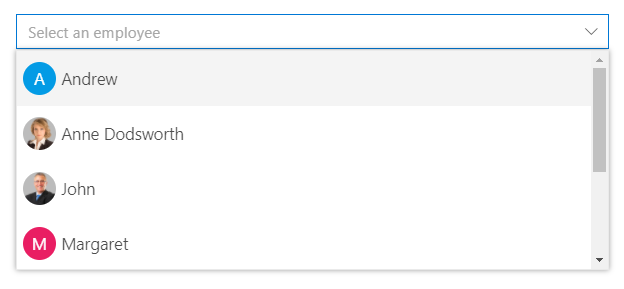
The Blazor DropDownList component is a replacement for HTML select tags with rich styling and powerful data binding capabilities.
Key features:
- Data Binding: Bind to local arrays, IEnumerable, API responses, and observable collections
- Single Selection: Non-editable selection of one value from a predefined list
- Filtering: Real-time text search with highlight matching in dropdown
- Grouping: Group items by category or custom field with collapsible groups
- Templates: Custom item , header , footer and value templates for rich content rendering
- Cascading: Dependent dropdowns with hierarchical data relationships
- Keyboard Navigation: Full keyboard support (Arrow keys, Enter, Escape) for accessibility
- UI Customization: Custom CSS, themes, and styling options for seamless integration
- Virtual Scrolling: Efficiently handles large datasets by loading items on demand, ensuring smooth scrolling performance
Documentation:
- Getting Started with Blazor Web App
- Getting Started with Blazor WebAssembly App
- Feature Overview
- Live Demos
- API Reference
Blazor MultiSelect Dropdown component
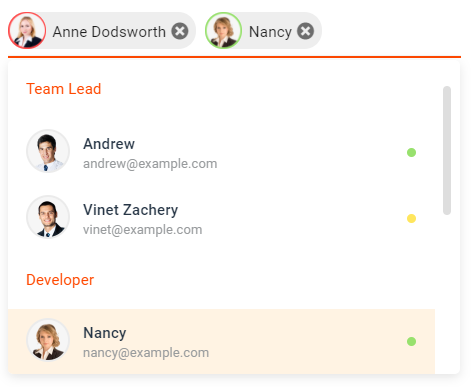
The Blazor MultiSelect Dropdown component enables selection of multiple values with checkboxes, tags display, and text filtering.
Key features:
- Multi-Select Support: Select and deselect multiple items simultaneously
- Checkbox Mode: Visual checkboxes for clear selection state indication
- Tag Display: Selected values shown as removable tags in input area
- Text Filtering: Type to filter and search within the dropdown list
- Grouping: Organize items into collapsible category groups
- Custom Tagging: Allow users to add custom values beyond predefined options
- Select All: Bulk selection/deselection of all available items
- Accessibility: Full keyboard navigation and ARIA support for screen readers
- Virtual Scrolling: Efficiently handles large datasets by loading items on demand, ensuring smooth scrolling performance
Documentation:
Blazor ListBox component
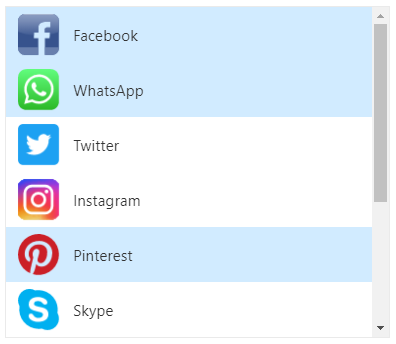
The Blazor ListBox component displays a scrollable list of items with multi-selection, drag-drop, and reordering capabilities.
Key features:
- Multi-Selection: Select one or multiple items with checkbox support
- Drag and Drop: Reorder items within the list or between ListBoxes
- Keyboard Navigation: Arrow keys, Shift+Click, and Ctrl+Click for multi-selection
- Sorting: Built-in ascending/descending sort functionality
- Grouping: Organize items into category groups with collapsible headers
- Reordering: Move selected items up/down with toolbar buttons
- Custom Templates: Rich templates for item rendering with HTML content
- Accessibility: Full keyboard support and ARIA labels for screen readers
Documentation:
- Getting Started with Blazor Web App
- Getting Started with Blazor WebAssembly App
- Feature Overview
- Live Demos
- API Reference
Blazor ComboBox component
The Blazor ComboBox component is an editable dropdown combining text input with a filtered suggestion list for flexible selection.
Key features:
- Editable Input: Type custom values or select from predefined options
- Filtering: Real-time search and filtering as user types in the input
- Data Binding: Support for arrays, API data, and observable collections
- Grouping: Organize dropdown items into category groups
- Cascading: Link multiple ComboBoxes for dependent data relationships
- Custom Templates: Rich item and header templates for enhanced presentation
- Keyboard Navigation: Full keyboard support with autocomplete suggestions
- Accessibility: ARIA labels, screen reader support, and keyboard-only navigation
- Virtual Scrolling: Efficiently handles large datasets by loading items on demand, ensuring smooth scrolling performance
Documentation:
- Getting Started with Blazor Web App
- Getting Started with Blazor WebAssembly App
- Feature Overview
- Live Demos
- API Reference
Blazor AutoComplete component
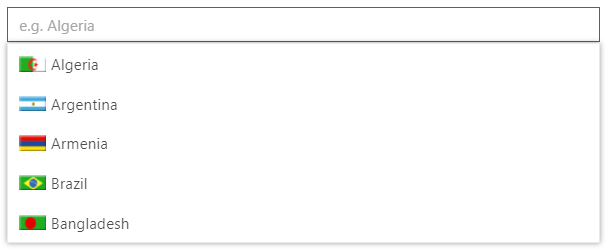
The Blazor AutoComplete Component provides intelligent suggestions as users type, streamlining data entry with predictive input.
Key features:
- Typeahead Suggestions: Display matching items as user types for faster selection
- Text Filtering: Highlight matching text with case-sensitive and case-insensitive options
- Data Binding: Bind to arrays, IEnumerable, API responses, and observables
- Grouping: Organize suggestions into category groups with headers
- Debounce Support: Optimize performance with configurable debounce intervals
- Min Characters: Require minimum characters before showing suggestions
- Custom Templates: Rich templates for suggestion rendering with HTML content
- Accessibility: Full keyboard navigation and ARIA support for screen readers
- Virtual Scrolling: Efficiently handles large datasets by loading items on demand, ensuring smooth scrolling performance
Documentation:
- Getting Started with Blazor Web App
- Getting Started with Blazor WebAssembly App
- Feature Overview
- Live Demos
- API Reference
Blazor Mention component
The Blazor Mention component enables user tagging and mentions similar to social media platforms, triggered by @ or custom symbols.
Key features:
- Mention Triggers: Customize mention character (@ by default) to activate suggestions
- Tagging Support: Tag users or items with @ mention similar to Facebook and Twitter
- Suggestion List: Display filtered suggestions as user types the mention character
- Data Binding: Bind to arrays, API data, and observable collections for mentions
- Grouping: Organize mentions into category groups with collapsible headers
- Custom Patterns: Support multiple mention patterns (@ for users, # for topics, etc.)
- Rich Templates: Custom templates for rendering mention suggestions and content
- Accessibility: Full keyboard navigation and ARIA support for screen readers
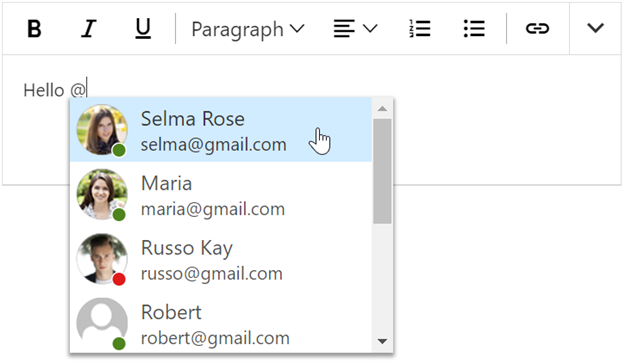
Documentation:
- Getting Started with Blazor Web App
- Getting Started with Blazor WebAssembly App
- Feature Overview
- Live Demos
- API Reference
System Requirements
- .NET 8.0 or later (Blazor Server, Blazor Web App, Blazor WebAssembly and Blazor Hybrid)
- See full requirements: System Requirements
Installation
Install the DropDowns package and the themes package, which provides the stylesheets referenced below:
dotnet add package Syncfusion.Blazor.DropDowns
dotnet add package Syncfusion.Blazor.Themes
Add stylesheet and script references
- For Blazor Server App / Blazor Web App, add these to
Components/App.razororApp.razorfile. - For Blazor WebAssembly App, add these to
wwwroot/index.htmlfile.
<link href="_content/Syncfusion.Blazor.Themes/fluent2.css" rel="stylesheet" />
<script src="_content/Syncfusion.Blazor.Core/scripts/syncfusion-blazor.min.js" type="text/javascript"></script>
Quick start
Register the Syncfusion Blazor services in the Program.cs file.
using Syncfusion.Blazor;

builder.Services.AddSyncfusionBlazor();
AutoComplete
<SfAutoComplete TValue="string" TItem="Country" Placeholder="e.g. Australia" DataSource="@LocalData">
    <AutoCompleteFieldSettings Value="Name" />
</SfAutoComplete>

@code {

    public class Country
    {
        public string Name { get; set; }
        public string Code { get; set; }
    }

    List<Country> LocalData = new List<Country> {
        new Country() { Name = "Australia", Code = "AU" },
        new Country() { Name = "Bermuda", Code = "BM" },
        new Country() { Name = "Canada", Code = "CA" },
        new Country() { Name = "Cameroon", Code = "CM" },
        new Country() { Name = "Denmark", Code = "DK" }
    };
}
ComboBox
<SfComboBox TValue="string" TItem="Games" Placeholder="Select a game" DataSource="@LocalData">
    <ComboBoxFieldSettings Value="ID" Text="Text"></ComboBoxFieldSettings>
</SfComboBox>

@code {
  public class Games
  {
    public string ID { get; set; }
    public string Text { get; set; }
  }
  List<Games> LocalData = new List<Games> {
    new Games() { ID= "Game1", Text= "American Football" },
    new Games() { ID= "Game2", Text= "Badminton" },
    new Games() { ID= "Game3", Text= "Basketball" },
    new Games() { ID= "Game4", Text= "Cricket" },
    new Games() { ID= "Game5", Text= "Football" },
    new Games() { ID= "Game6", Text= "Golf" },
    new Games() { ID= "Game7", Text= "Hockey" },
    new Games() { ID= "Game8", Text= "Rugby"},
    new Games() { ID= "Game9", Text= "Snooker" },
    new Games() { ID= "Game10", Text= "Tennis"},
  };
}
DropDownList
<SfDropDownList TValue="string" TItem="Games" Placeholder="Select a game" DataSource="@LocalData">
  <DropDownListFieldSettings Value="ID" Text="Text"></DropDownListFieldSettings>
</SfDropDownList>

@code {
  public class Games
  {
    public string ID { get; set; }
    public string Text { get; set; }
  }
  List<Games> LocalData = new List<Games> {
    new Games() { ID= "Game1", Text= "American Football" },
    new Games() { ID= "Game2", Text= "Badminton" },
    new Games() { ID= "Game3", Text= "Basketball" },
    new Games() { ID= "Game4", Text= "Cricket" },
    new Games() { ID= "Game5", Text= "Football" },
    new Games() { ID= "Game6", Text= "Golf" },
    new Games() { ID= "Game7", Text= "Hockey" },
    new Games() { ID= "Game8", Text= "Rugby"},
    new Games() { ID= "Game9", Text= "Snooker" },
    new Games() { ID= "Game10", Text= "Tennis"},
  };
}
ListBox
<SfListBox TValue="string[]" DataSource="@Vehicles" TItem="VehicleData">
    <ListBoxFieldSettings Text="Text" Value="Id" />
</SfListBox>
@code {
    public List<VehicleData> Vehicles = new List<VehicleData> {
        new VehicleData { Text = "Hennessey Venom", Id = "Vehicle-01" },
        new VehicleData { Text = "Bugatti Chiron", Id = "Vehicle-02" },
        new VehicleData { Text = "Bugatti Veyron Super Sport", Id = "Vehicle-03" },
        new VehicleData { Text = "SSC Ultimate Aero", Id = "Vehicle-04" },
        new VehicleData { Text = "Koenigsegg CCR", Id = "Vehicle-05" },
        new VehicleData { Text = "McLaren F1", Id = "Vehicle-06" },
        new VehicleData { Text = "Aston Martin One- 77", Id = "Vehicle-07" },
        new VehicleData { Text = "Jaguar XJ220", Id = "Vehicle-08" }
    };

    public class VehicleData {
      public string Text { get; set; }
      public string Id { get; set; }
    }
}
Mention
<SfMention TItem="PersonData" DataSource="@EmailData">
    <TargetComponent>
        <div id="commentsMention" placeHolder="Type @@ and tag user" ></div>
    </TargetComponent>
    <ChildContent>
        <MentionFieldSettings Text="Name"></MentionFieldSettings>
    </ChildContent>
</SfMention>
<style>
    #commentsMention {
        min-height: 100px;
        border: 1px solid #D7D7D7;
        border-radius: 4px;
        padding: 8px;
        font-size: 14px;
        width: 600px;
    }

    div#commentsMention[placeholder]:empty:before {
        content: attr(placeholder);
        color: #555;
    }
</style>
@code {
    public class PersonData
    {
        public string Name { get; set; }
        public string EmailId { get; set; }
        public string EmployeeImage { get; set; }
    }
    List<PersonData> EmailData = new List<PersonData> {
    new PersonData() { Name="Selma Rose", EmployeeImage="7", EmailId="selma@gmail.com" },
    new PersonData() { Name="Russo Kay", EmployeeImage="8", EmailId="russo@gmail.com" },
    new PersonData() { Name="Camden Kate", EmployeeImage="9", EmailId="camden@gmail.com" }
  };
}
MultiSelect
<SfMultiSelect TValue="string[]" TItem="Games" Placeholder="Favorite Sports" DataSource="@LocalData">
    <MultiSelectFieldSettings Text="Text" Value="ID"></MultiSelectFieldSettings>
</SfMultiSelect>

@code {

    public class Games
    {
        public string ID { get; set; }
        public string Text { get; set; }
    }
    List<Games> LocalData = new List<Games> {
    new Games() { ID= "Game1", Text= "American Football" },
    new Games() { ID= "Game2", Text= "Badminton" },
    new Games() { ID= "Game3", Text= "Basketball" },
    new Games() { ID= "Game4", Text= "Cricket" },
    new Games() { ID= "Game5", Text= "Football" },
    new Games() { ID= "Game6", Text= "Golf" },
    new Games() { ID= "Game7", Text= "Hockey" },
    new Games() { ID= "Game8", Text= "Rugby"},
    new Games() { ID= "Game9", Text= "Snooker" },
    new Games() { ID= "Game10", Text= "Tennis"},
    };
}
Support
License
This is a commercial product and requires a paid license for possession or use. Review the Syncfusion EULA.
About Syncfusion
Syncfusion provides 1600+ UI components and frameworks for web, mobile, and desktop development across multiple platforms:
Web: Blazor | ASP.NET Core | ASP.NET MVC | JavaScript | Angular | React | Vue
Desktop: WinForms | WPF | WinUI
Learn more at www.syncfusion.com.
sales@syncfusion.com | Toll Free: 1-888-9-DOTNET