Syncfusion.Blazor.SplitButtons 28.1.41
Syncfusion® Blazor SplitButton Components
This package contains Blazor Button Group, Blazor Dropdown Menu, Blazor Split Button and Blazor Progress Button components for Blazor application.
System Requirements
Blazor Button Group
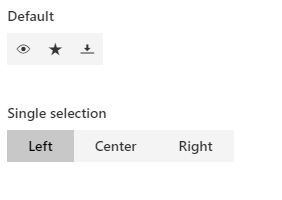
The Blazor Button Group is a series of buttons aligned vertically or horizontally. It has several built-in features such as predefined styles, selection, nesting, different sizes, rounded corners, RTL, and UI customization.
Getting Started
Resources
- Blazor Button Group Component Features Overview
- Blazor Button Group Component Documentation
- Blazor Button Group Component Demos
Blazor Dropdown Menu
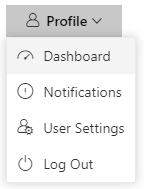
The Blazor Dropdown Menu is a graphical user interface component that lets users choose from a list of actions that can be triggered. It has built-in support for icons and their positioning, various sizes, separators, RTL, and UI customization.
Getting Started
Resources
- Blazor Dropdown Menu Component Features Overview
- Blazor Dropdown Menu Component Documentation
- Blazor Dropdown Menu Component Demos
Blazor Split Button
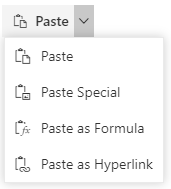
The Blazor Split Button triggers a default action when the primary button is clicked and provides a list of actions when the drop-down button is clicked. It has built-in support for icons and their positioning, varied sizes, disabling items, separators, RTL, and UI customization.
Getting Started
Resources
- Blazor Split Button Component Features Overview
- Blazor Split Button Component Documentation
- Blazor Split Button Component Demos
Blazor Progress Button
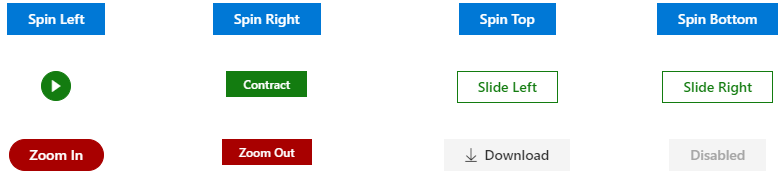
The Blazor Progress Button is a graphical user interface component used to visualize the progression of an operation in the background. It has built-in features such as predefined styles, different button types, and spinner and UI customization.
Getting Started
Resources
- Blazor Progress Button Component Features Overview
- Blazor Progress Button Component Documentation
- Blazor Progress Button Component Demos
Support and feedback
- For any other queries, reach our Syncfusion® support team or post the queries through the community forums.
- Provide feature request through the Syncfusion® feedback portal
License
This is a commercial product and requires a paid license for possession or use. Syncfusion® licensed software, including this component, is subject to the terms and conditions of Syncfusion® EULA. You can purchase a license here or start a free 30-day trial here.
About Syncfusion®
Founded in 2001 and headquartered in Research Triangle Park, N.C., Syncfusion® has more than 29,000 customers and more than 1 million users, including large financial institutions, Fortune 500 companies, and global IT consultancies.
Today, we provide 1800+ components and frameworks for web (Blazor, ASP.NET Core, ASP.NET MVC, ASP.NET WebForms, JavaScript, Angular, React, Vue, and Flutter), mobile (Xamarin, Flutter, UWP, and JavaScript), and desktop development (WinForms, WPF, WinUI, Flutter and UWP). We provide ready-to-deploy enterprise software for dashboards, reports, data integration, and big data processing. Many customers have saved millions in licensing fees by deploying our software.
sales@syncfusion.com | www.syncfusion.com | Toll Free: 1-888-9 DOTNET
Showing the top 20 packages that depend on Syncfusion.Blazor.SplitButtons.
| Packages | Downloads |
|---|---|
|
Syncfusion.Blazor.Inputs
This package provides the functionality to utilize the features of Syncfusion Blazor Color Picker, File Upload, MaskedTextBox, NumericTextBox, Slider, TextBox and Rating.
|
2 |
|
Syncfusion.Blazor.Inputs
This package provides the functionality to utilize the features of Syncfusion® Blazor Color Picker, File Upload, MaskedTextBox, NumericTextBox, Slider, TextBox and Rating.
|
2 |
|
Syncfusion.Blazor.Inputs
This package provides the functionality to utilize the features of Syncfusion Blazor Color Picker, File Upload, MaskedTextBox, NumericTextBox, Slider, and TextBox.
|
2 |
|
Syncfusion.Blazor.Inputs
A package of Blazor Input textbox components. It comes with a collection of form components which is useful to get different input values from the users such as text, numbers, color and file inputs.
List of components:
• ColorPicker
• File Upload
• MaskedTextBox
• NumericTextBox
• Slider
• TextBox
ColorPicker:
ColorPicker component is a user interface to select and adjust color values.
Key features:
• Color specification - Supports Red Green Blue, Hue Saturation Value and Hex codes.
• Custom palettes - Allows you to customize palettes and supports multiple palette groups rendering.
Helpful links:
Feature Tour: https://www.syncfusion.com/blazor-components/blazor-color-picker
Documentation: https://blazor.syncfusion.com/documentation/color-picker/
Demos: https://blazor.syncfusion.com/demos/color-picker/default-functionalities
TextBox:
The Blazor TextBox is a component for editing, displaying, or entering plain text on forms to capture username, email, and more.
Key features:
• Floating Label - Floats the placeholder text while focus.
• Multiline - Handles multiline input with placeholder text.
Helpful links:
Feature Tour: https://www.syncfusion.com/blazor-components/blazor-textbox
Documentation: https://blazor.syncfusion.com/documentation/textbox/getting-started/
Demos: https://blazor.syncfusion.com/demos/textbox/default-functionalities
NumericTextBox:
The Blazor Numeric Textbox component is a quick replacement of the number-type HTML input element.
Key features:
• Range Validation - Allows to set the minimum and maximum range of values.
• Number Formats - Supports the number display formatting with MSDN standard.
Helpful links:
Feature Tour: https://www.syncfusion.com/blazor-components/blazor-numeric-textbox
Documentation: https://blazor.syncfusion.com/documentation/numeric-textbox/getting-started/
Demos: https://blazor.syncfusion.com/demos/numeric-textbox/default-functionalities
MaskedTextBox:
The Blazor Input Mask is a component that provides an easy and reliable way to collect user input based on a standard mask.
Key features:
• Custom Characters - Allows to use your own characters as the mask elements.
• Regular Expression - Can be used as a mask element for each character.
Helpful links:
Feature Tour: https://www.syncfusion.com/blazor-components/blazor-input-mask
Documentation: https://blazor.syncfusion.com/documentation/input-mask/getting-started/
Demos: https://blazor.syncfusion.com/demos/input-mask/default-functionalities
File Upload:
The Blazor File Upload is a component for uploading one or multiple files, images, documents, and other files to a server.
Key features:
• Chunk Upload - Used to upload large files as chunks.
• Validation - Validate extension and size of upload file.
• Auto Upload - Process the file to upload without interaction.
Helpful links:
Feature Tour: https://www.syncfusion.com/blazor-components/blazor-file-upload
Documentation: https://blazor.syncfusion.com/documentation/file-upload/getting-started/
Demos: https://blazor.syncfusion.com/demos/file-upload/default-functionalities
Support:
Incident: https://www.syncfusion.com/support/directtrac/incidents/newincident/?utm_source=nuget&utm_medium=listing
Forum: https://www.syncfusion.com/forums/blazor-components/?utm_source=nuget&utm_medium=listing
This is a commercial product and requires a paid license for possession or use. Syncfusion’s licensed software, including this component, is subject to the terms and conditions of Syncfusion's EULA (https://www.syncfusion.com/eula/es/). To acquire a license, you can purchase one at https://www.syncfusion.com/sales/products or start a free 30-day trial here (https://www.syncfusion.com/account/manage-trials/start-trials).
© Copyright 2021 Syncfusion, Inc. All Rights Reserved. The Syncfusion Essential Studio license and copyright applies to this distribution.
|
2 |
|
Syncfusion.Blazor.SfPdfViewer
This package provides the functionality to utilize the features of Syncfusion® Blazor PDF
Viewer component and more.
|
1 |
|
Syncfusion.Blazor.Inputs
This package provides the functionality to utilize the features of Syncfusion® Blazor Color Picker, File Upload, MaskedTextBox, NumericTextBox, Slider, TextBox and Rating.
|
1 |
|
Syncfusion.Blazor.Inputs
This package provides the functionality to utilize the features of Syncfusion Blazor Color Picker, File Upload, MaskedTextBox, NumericTextBox, Slider, and TextBox.
|
1 |
.NET 6.0
- Syncfusion.Blazor.Buttons (>= 28.1.41)
- Syncfusion.Blazor.Core (>= 28.1.41)
- Syncfusion.Blazor.Popups (>= 28.1.41)
- Syncfusion.Blazor.Spinner (>= 28.1.41)
.NET 7.0
- Syncfusion.Blazor.Buttons (>= 28.1.41)
- Syncfusion.Blazor.Core (>= 28.1.41)
- Syncfusion.Blazor.Popups (>= 28.1.41)
- Syncfusion.Blazor.Spinner (>= 28.1.41)
.NET 8.0
- Syncfusion.Blazor.Buttons (>= 28.1.41)
- Syncfusion.Blazor.Core (>= 28.1.41)
- Syncfusion.Blazor.Popups (>= 28.1.41)
- Syncfusion.Blazor.Spinner (>= 28.1.41)
.NET 9.0
- Syncfusion.Blazor.Buttons (>= 28.1.41)
- Syncfusion.Blazor.Core (>= 28.1.41)
- Syncfusion.Blazor.Popups (>= 28.1.41)
- Syncfusion.Blazor.Spinner (>= 28.1.41)
| Version | Downloads | Last updated |
|---|---|---|
| 31.2.16 | 1 | 12/05/2025 |
| 31.2.15 | 2 | 12/05/2025 |
| 31.2.12 | 1 | 12/05/2025 |
| 31.2.10 | 1 | 12/05/2025 |
| 31.2.5 | 0 | 11/03/2025 |
| 31.2.4 | 0 | 10/28/2025 |
| 31.2.3 | 0 | 10/21/2025 |
| 31.2.2 | 0 | 10/15/2025 |
| 31.1.23 | 1 | 12/06/2025 |
| 31.1.22 | 1 | 12/05/2025 |
| 31.1.21 | 1 | 12/06/2025 |
| 31.1.20 | 1 | 12/05/2025 |
| 31.1.19 | 1 | 12/06/2025 |
| 31.1.18 | 1 | 12/06/2025 |
| 31.1.17 | 1 | 12/06/2025 |
| 30.2.7 | 0 | 08/25/2025 |
| 30.2.6 | 0 | 08/18/2025 |
| 30.2.5 | 0 | 08/13/2025 |
| 30.2.4 | 0 | 08/07/2025 |
| 30.1.42 | 0 | 07/28/2025 |
| 30.1.41 | 1 | 12/05/2025 |
| 30.1.40 | 1 | 12/05/2025 |
| 30.1.39 | 1 | 12/05/2025 |
| 30.1.38 | 1 | 12/05/2025 |
| 30.1.37 | 1 | 12/05/2025 |
| 29.2.11 | 1 | 12/05/2025 |
| 29.2.10 | 1 | 12/05/2025 |
| 29.2.9 | 0 | 06/05/2025 |
| 29.2.8 | 0 | 06/03/2025 |
| 29.2.7 | 0 | 05/26/2025 |
| 29.2.5 | 1 | 12/06/2025 |
| 29.2.4 | 0 | 05/14/2025 |
| 29.1.41 | 1 | 12/05/2025 |
| 29.1.40 | 0 | 04/28/2025 |
| 29.1.39 | 1 | 12/05/2025 |
| 29.1.38 | 0 | 04/14/2025 |
| 29.1.37 | 0 | 04/08/2025 |
| 29.1.35 | 0 | 04/01/2025 |
| 29.1.33 | 1 | 12/05/2025 |
| 28.2.12 | 1 | 12/05/2025 |
| 28.2.11 | 1 | 12/05/2025 |
| 28.2.9 | 0 | 03/04/2025 |
| 28.2.7 | 0 | 02/25/2025 |
| 28.2.6 | 0 | 02/17/2025 |
| 28.2.5 | 0 | 02/11/2025 |
| 28.2.4 | 0 | 02/04/2025 |
| 28.2.3 | 0 | 01/29/2025 |
| 28.1.41 | 1 | 12/05/2025 |
| 28.1.39 | 0 | 01/13/2025 |
| 28.1.38 | 1 | 12/05/2025 |
| 28.1.37 | 0 | 12/31/2024 |
| 28.1.36 | 0 | 12/23/2024 |
| 28.1.35 | 0 | 12/18/2024 |
| 28.1.33 | 1 | 12/05/2025 |
| 27.2.5 | 0 | 12/02/2024 |
| 27.2.4 | 0 | 11/26/2024 |
| 27.2.3 | 0 | 11/22/2024 |
| 27.2.2 | 0 | 11/15/2024 |
| 27.1.58 | 0 | 11/04/2024 |
| 27.1.57 | 1 | 12/05/2025 |
| 27.1.56 | 0 | 10/23/2024 |
| 27.1.55 | 1 | 12/05/2025 |
| 27.1.53 | 0 | 10/14/2024 |
| 27.1.52 | 1 | 12/05/2025 |
| 27.1.51 | 1 | 12/05/2025 |
| 27.1.50 | 0 | 09/23/2024 |
| 27.1.48 | 0 | 09/18/2024 |
| 26.2.14 | 1 | 12/05/2025 |
| 26.2.13 | 1 | 12/05/2025 |
| 26.2.12 | 1 | 12/05/2025 |
| 26.2.11 | 1 | 12/05/2025 |
| 26.2.10 | 1 | 12/05/2025 |
| 26.2.9 | 0 | 08/12/2024 |
| 26.2.8 | 0 | 08/05/2024 |
| 26.2.7 | 0 | 07/29/2024 |
| 26.2.5 | 0 | 07/26/2024 |
| 26.2.4 | 0 | 07/24/2024 |
| 26.1.42 | 1 | 12/05/2025 |
| 26.1.41 | 1 | 12/05/2025 |
| 26.1.40 | 0 | 07/01/2024 |
| 26.1.39 | 0 | 06/24/2024 |
| 26.1.38 | 0 | 06/18/2024 |
| 26.1.35 | 0 | 06/11/2024 |
| 25.2.7 | 0 | 06/03/2024 |
| 25.2.6 | 0 | 05/28/2024 |
| 25.2.5 | 0 | 05/21/2024 |
| 25.2.4 | 0 | 05/14/2024 |
| 25.2.3 | 0 | 05/08/2024 |
| 25.1.42 | 1 | 12/05/2025 |
| 25.1.41 | 1 | 12/05/2025 |
| 25.1.40 | 0 | 04/15/2024 |
| 25.1.39 | 0 | 04/08/2024 |
| 25.1.38 | 0 | 04/01/2024 |
| 25.1.37 | 0 | 03/26/2024 |
| 25.1.35 | 1 | 12/05/2025 |
| 24.2.9 | 0 | 03/04/2024 |
| 24.2.8 | 0 | 02/26/2024 |
| 24.2.7 | 0 | 02/19/2024 |
| 24.2.6 | 0 | 02/14/2024 |
| 24.2.5 | 0 | 02/12/2024 |
| 24.2.4 | 0 | 02/05/2024 |
| 24.2.3 | 0 | 01/31/2024 |
| 24.1.47 | 1 | 12/05/2025 |
| 24.1.46 | 1 | 12/05/2025 |
| 24.1.45 | 1 | 12/05/2025 |
| 24.1.44 | 2 | 12/05/2025 |
| 24.1.43 | 1 | 12/05/2025 |
| 24.1.41 | 1 | 12/05/2025 |
| 23.2.7 | 0 | 12/06/2023 |
| 23.2.6 | 0 | 11/28/2023 |
| 23.2.5 | 0 | 11/23/2023 |
| 23.2.4 | 0 | 11/20/2023 |
| 23.1.44 | 1 | 12/05/2025 |
| 23.1.43 | 1 | 12/05/2025 |
| 23.1.42 | 1 | 12/05/2025 |
| 23.1.41 | 1 | 12/05/2025 |
| 23.1.40 | 0 | 10/10/2023 |
| 23.1.39 | 1 | 12/05/2025 |
| 23.1.38 | 1 | 12/05/2025 |
| 23.1.36 | 1 | 12/05/2025 |
| 22.2.12 | 1 | 12/05/2025 |
| 22.2.11 | 1 | 12/05/2025 |
| 22.2.10 | 1 | 12/05/2025 |
| 22.2.9 | 0 | 08/14/2023 |
| 22.2.8 | 0 | 08/07/2023 |
| 22.2.7 | 0 | 08/02/2023 |
| 22.2.5 | 1 | 12/05/2025 |
| 22.1.39 | 1 | 12/05/2025 |
| 22.1.38 | 1 | 12/05/2025 |
| 22.1.37 | 1 | 12/05/2025 |
| 22.1.36 | 1 | 12/05/2025 |
| 22.1.34 | 1 | 12/05/2025 |
| 21.2.10 | 1 | 12/05/2025 |
| 21.2.9 | 0 | 06/06/2023 |
| 21.2.8 | 0 | 05/30/2023 |
| 21.2.6 | 0 | 05/22/2023 |
| 21.2.5 | 0 | 05/15/2023 |
| 21.2.4 | 0 | 05/09/2023 |
| 21.2.3 | 0 | 05/03/2023 |
| 21.1.41 | 1 | 12/05/2025 |
| 21.1.39 | 1 | 12/05/2025 |
| 21.1.38 | 1 | 12/05/2025 |
| 21.1.37 | 1 | 12/05/2025 |
| 21.1.35 | 1 | 12/05/2025 |
| 20.4.0.54 | 0 | 03/13/2023 |
| 20.4.0.53 | 0 | 03/07/2023 |
| 20.4.0.52 | 0 | 02/28/2023 |
| 20.4.0.51 | 0 | 02/21/2023 |
| 20.4.0.50 | 0 | 02/14/2023 |
| 20.4.0.49 | 0 | 02/07/2023 |
| 20.4.0.48 | 0 | 02/01/2023 |
| 20.4.0.44 | 0 | 01/18/2023 |
| 20.4.0.43 | 0 | 01/10/2023 |
| 20.4.0.42 | 0 | 01/04/2023 |
| 20.4.0.41 | 0 | 12/29/2022 |
| 20.4.0.40 | 0 | 12/28/2022 |
| 20.4.0.38 | 0 | 12/21/2022 |
| 20.3.0.61 | 0 | 12/12/2022 |
| 20.3.0.60 | 0 | 12/06/2022 |
| 20.3.0.59 | 0 | 11/29/2022 |
| 20.3.0.58 | 0 | 11/22/2022 |
| 20.3.0.57 | 0 | 11/15/2022 |
| 20.3.0.56 | 0 | 11/08/2022 |
| 20.3.0.52 | 0 | 10/27/2022 |
| 20.3.0.50 | 0 | 10/18/2022 |
| 20.3.0.49 | 0 | 10/11/2022 |
| 20.3.0.48 | 0 | 10/05/2022 |
| 20.3.0.47 | 0 | 09/29/2022 |
| 20.2.0.50 | 0 | 09/20/2022 |
| 20.2.0.49 | 0 | 09/13/2022 |
| 20.2.0.48 | 0 | 09/06/2022 |
| 20.2.0.46 | 0 | 08/30/2022 |
| 20.2.0.45 | 0 | 08/23/2022 |
| 20.2.0.44 | 0 | 08/16/2022 |
| 20.2.0.43 | 0 | 08/08/2022 |
| 20.2.0.40 | 0 | 07/26/2022 |
| 20.2.0.39 | 0 | 07/19/2022 |
| 20.2.0.38 | 0 | 07/12/2022 |
| 20.2.0.36 | 0 | 06/30/2022 |
| 20.1.0.61 | 1 | 12/06/2025 |
| 20.1.0.60 | 0 | 06/14/2022 |
| 20.1.0.59 | 0 | 06/07/2022 |
| 20.1.0.58 | 0 | 05/31/2022 |
| 20.1.0.57 | 0 | 05/24/2022 |
| 20.1.0.56 | 0 | 05/17/2022 |
| 20.1.0.55 | 0 | 05/12/2022 |
| 20.1.0.52 | 0 | 05/03/2022 |
| 20.1.0.51 | 0 | 04/26/2022 |
| 20.1.0.50 | 0 | 04/19/2022 |
| 20.1.0.48 | 0 | 04/12/2022 |
| 20.1.0.47 | 0 | 04/04/2022 |
| 19.4.0.56 | 1 | 12/05/2025 |
| 19.4.0.55 | 0 | 03/08/2022 |
| 19.4.0.54 | 0 | 03/01/2022 |
| 19.4.0.53 | 0 | 02/22/2022 |
| 19.4.0.52 | 1 | 12/05/2025 |
| 19.4.0.50 | 0 | 02/08/2022 |
| 19.4.0.48 | 0 | 01/31/2022 |
| 19.4.0.47 | 0 | 01/25/2022 |
| 19.4.0.43 | 0 | 01/18/2022 |
| 19.4.0.42 | 0 | 01/11/2022 |
| 19.4.0.41 | 0 | 01/04/2022 |
| 19.4.0.40 | 0 | 12/28/2021 |
| 19.4.0.38 | 0 | 12/17/2021 |
| 19.3.0.59 | 0 | 12/14/2021 |
| 19.3.0.57 | 0 | 12/07/2021 |
| 19.3.0.56 | 0 | 11/30/2021 |
| 19.3.0.55 | 0 | 11/23/2021 |
| 19.3.0.54 | 0 | 11/17/2021 |
| 19.3.0.53 | 0 | 11/12/2021 |
| 19.3.0.48 | 0 | 11/02/2021 |
| 19.3.0.47 | 0 | 10/26/2021 |
| 19.3.0.46 | 0 | 10/19/2021 |
| 19.3.0.45 | 0 | 10/12/2021 |
| 19.3.0.44 | 0 | 10/05/2021 |
| 19.3.0.43 | 0 | 09/30/2021 |
| 19.2.0.62 | 0 | 09/13/2021 |
| 19.2.0.60 | 0 | 09/07/2021 |
| 19.2.0.59 | 0 | 08/30/2021 |
| 19.2.0.57 | 1 | 12/05/2025 |
| 19.2.0.56 | 1 | 12/05/2025 |
| 19.2.0.55 | 1 | 12/06/2025 |
| 19.2.0.51 | 0 | 08/02/2021 |
| 19.2.0.49 | 0 | 07/27/2021 |
| 19.2.0.48 | 1 | 12/05/2025 |
| 19.2.0.47 | 1 | 12/05/2025 |
| 19.2.0.46 | 1 | 12/05/2025 |
| 19.2.0.44 | 0 | 06/30/2021 |
| 19.1.0.69 | 0 | 06/14/2021 |
| 19.1.0.67 | 0 | 06/07/2021 |
| 19.1.0.66 | 0 | 05/31/2021 |
| 19.1.0.65 | 0 | 05/24/2021 |
| 19.1.0.64 | 0 | 05/19/2021 |
| 19.1.0.63 | 0 | 05/13/2021 |
| 19.1.0.59 | 0 | 05/03/2021 |
| 19.1.0.58 | 0 | 04/26/2021 |
| 19.1.0.57 | 0 | 04/20/2021 |
| 19.1.0.56 | 0 | 04/13/2021 |
| 19.1.0.55 | 0 | 04/06/2021 |
| 19.1.0.54 | 0 | 03/30/2021 |
| 18.4.0.49 | 0 | 03/23/2021 |
| 18.4.0.48 | 0 | 03/16/2021 |
| 18.4.0.47 | 0 | 03/09/2021 |
| 18.4.0.46 | 0 | 03/02/2021 |
| 18.4.0.44 | 0 | 02/23/2021 |
| 18.4.0.43 | 0 | 02/15/2021 |
| 18.4.0.42 | 0 | 02/09/2021 |
| 18.4.0.41 | 0 | 02/02/2021 |
| 18.4.0.39 | 0 | 01/28/2021 |
| 18.4.0.35 | 0 | 01/19/2021 |
| 18.4.0.34 | 0 | 01/12/2021 |
| 18.4.0.33 | 0 | 01/04/2021 |
| 18.4.0.32 | 0 | 12/30/2020 |
| 18.4.0.31 | 0 | 12/22/2020 |
| 18.4.0.30 | 0 | 12/17/2020 |